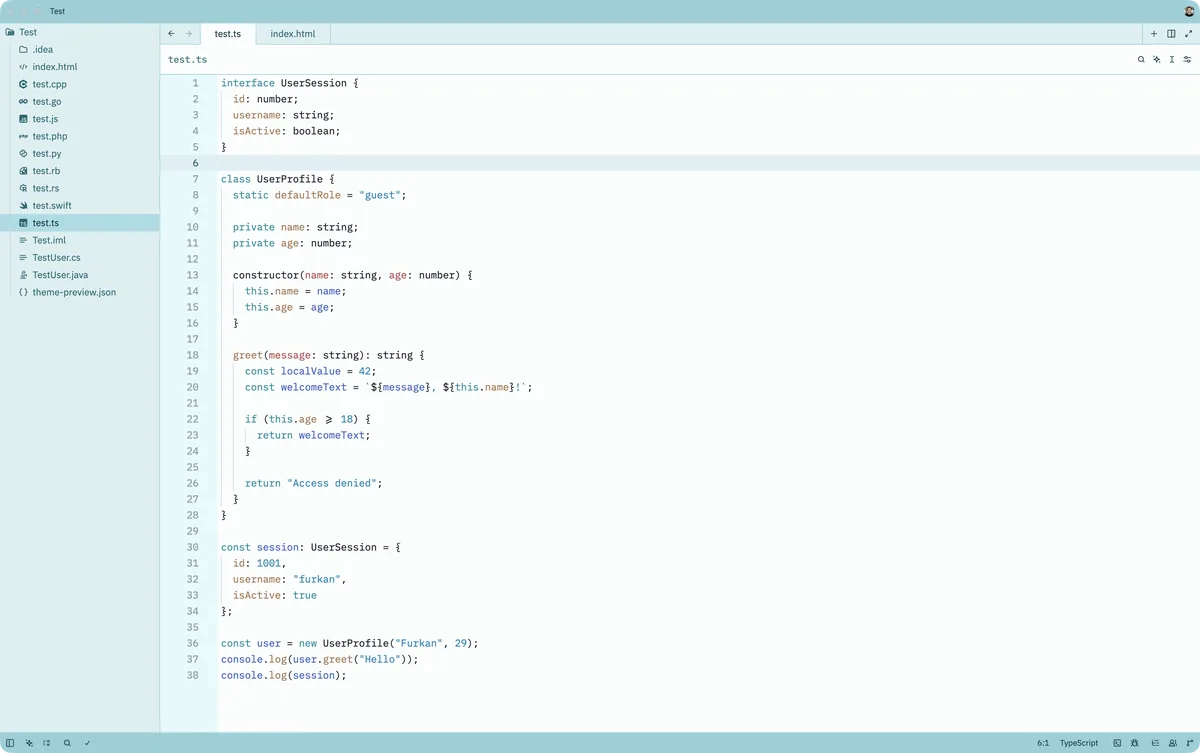
Inspired by the soft daylight and sea breezes of Istanbul, this theme blends calm turquoise tones with warm historical accents to create a serene yet expressive coding environment. Light, airy backgrounds keep the editor clean and comfortable, while teals, aquas, and muted golden hues add clarity and focus to essential syntax elements.
A light theme from the Codigrate Cities collection, released 2026-01-03. Tags: Mediterranean, Historic, Airy.
A free download from codigrate.com under the MIT licence: add it to your cart, enter the e-mail address the download link goes to, and get the theme file with its install steps.
Getting started on Zed
- Download the zip with the Download button. Inside is one folder with the theme file ( themes/<name>.json ) and a small extension.toml.
- Copy the .json file from the themes folder into ~/.config/zed/themes/ ( the same path on macOS and Linux; on a Mac, Shift+Cmd+G in Finder takes you to the path ). If the folder is not there yet, create it.
- In Zed, open the theme selector with Cmd+K Cmd+T ( Ctrl+K Ctrl+T on Linux ) and pick the theme by name, and the theme is applied.
- Prefer an extension? In Zed open Extensions, click Install Dev Extension and choose the unzipped folder itself; the theme then shows in the selector the same way.
Istanbul color palette
Every named color of the Istanbul palette, free to download for MacOS, CorelDRAW and Figma.
Istanbul on every platform
- Istanbul for JetBrains (free)
- Istanbul for Xcode ($2.99)
- Istanbul for VS Code (free)
- Istanbul for Chrome (free)
- Istanbul for Open VSX (free)
- Istanbul for Slack (free)
- Istanbul for MacOS Terminal (free)
- Istanbul for iTerm2 (free)
- Istanbul for Ghostty (free)
- Istanbul for Rhino (free)
- Istanbul for Zed (free), this page
- Istanbul for Sublime Text (free)
- Istanbul for Line
From the blog
- Anatomy of a Light Theme: Istanbul: Anatomy of Istanbul, a light IDE theme: marble white backgrounds, a midnight teal foreground, and syntax in Iznik turquoise, rooftop red and bazaar copper.