Inspired by Prague's midnight river reflections, gothic silhouettes, and warm lamplight on old stone, this theme pairs deep cobalt-navy shadows with cool steel blues for a calm, cinematic coding mood. Rich surfaces and crisp selections keep focus sharp, while a bright sky-blue accent and subtle golden highlights add contrast across tabs, hovers, and search matches.
A dark theme from the Codigrate Cities collection, released 2026-02-04. Tags: Gothic, Historic, Timeless.
Sold on codigrate.com for $1.99, one payment, tax included: add it to your cart, pay with Stripe (cards, Apple Pay, Google Pay), and download the theme right away. No account needed. Personal licence; a digital download, so all sales are final (see the terms of sale).
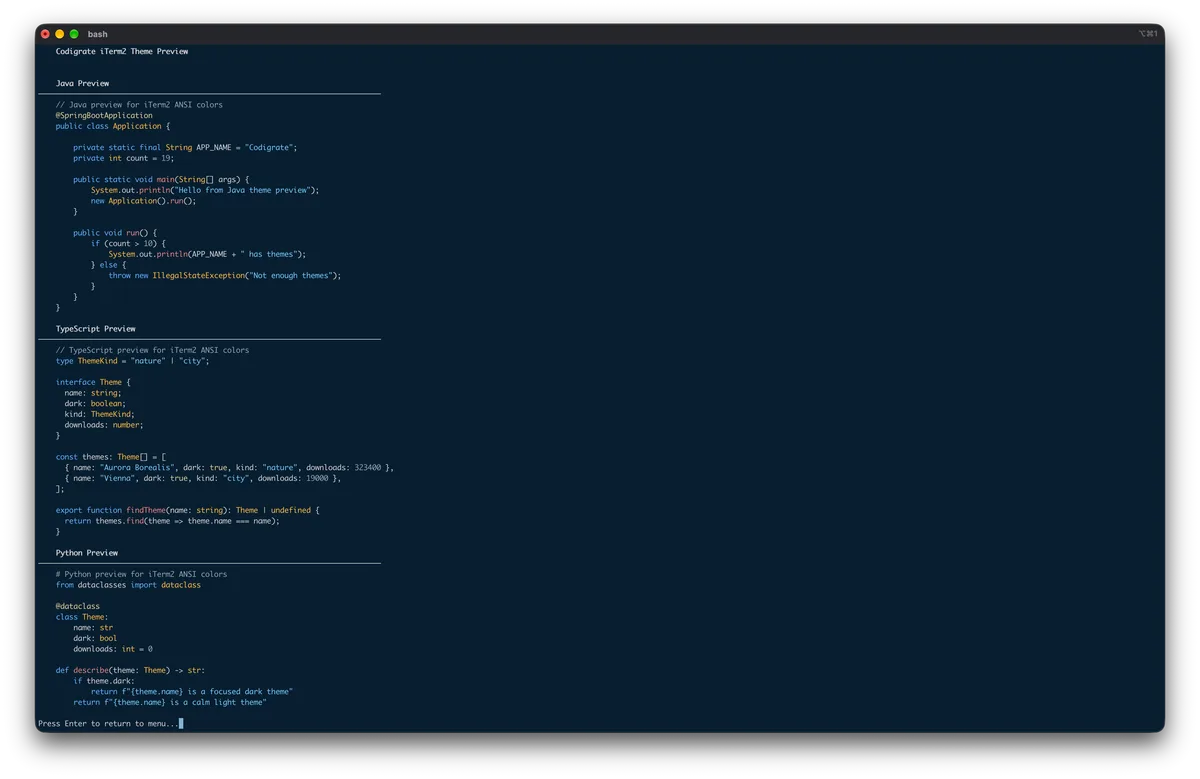
Getting started on iTerm2
- Download the .itermcolors file with the Download button.
- In iTerm2, open Settings → Profiles → Colors.
- Open the Color Presets… dropdown at the bottom right, choose Import…, and select the downloaded file.
- Open the Color Presets… dropdown again and pick the theme by name, and the theme is applied.
Prague color palette
Every named color of the Prague palette, free to download for MacOS, CorelDRAW and Figma.
Prague on every platform
- Prague for JetBrains
- Prague for Xcode ($2.99)
- Prague for Zed ($1.99)
- Prague for Firefox ($1.99)
- Prague for Sublime Text ($1.99)
- Prague for MacOS Terminal ($1.99)
- Prague for iTerm2 ($1.99), this page
- Prague for Ghostty ($1.99)
- Prague for Claude Code ($0.99)
- Prague for Codex ($0.99)
- Prague for OpenCode ($0.99)
- Prague for Rhino ($1.99)
- Prague for Slack ($0.99)
- Prague for Line
From the blog
- Anatomy of a Dark Theme: Prague: Anatomy of Prague, a dark IDE theme: deep Vltava blues for the frame and the keywords, lit by gas lamp amber, rooftop copper and straw gold.